Building the week
The drag-and-drop Shift Builder fills a schedule fast — your crew on one side, the month's open slots on the other, with smart helpers doing the thinking.
The Shift Builder
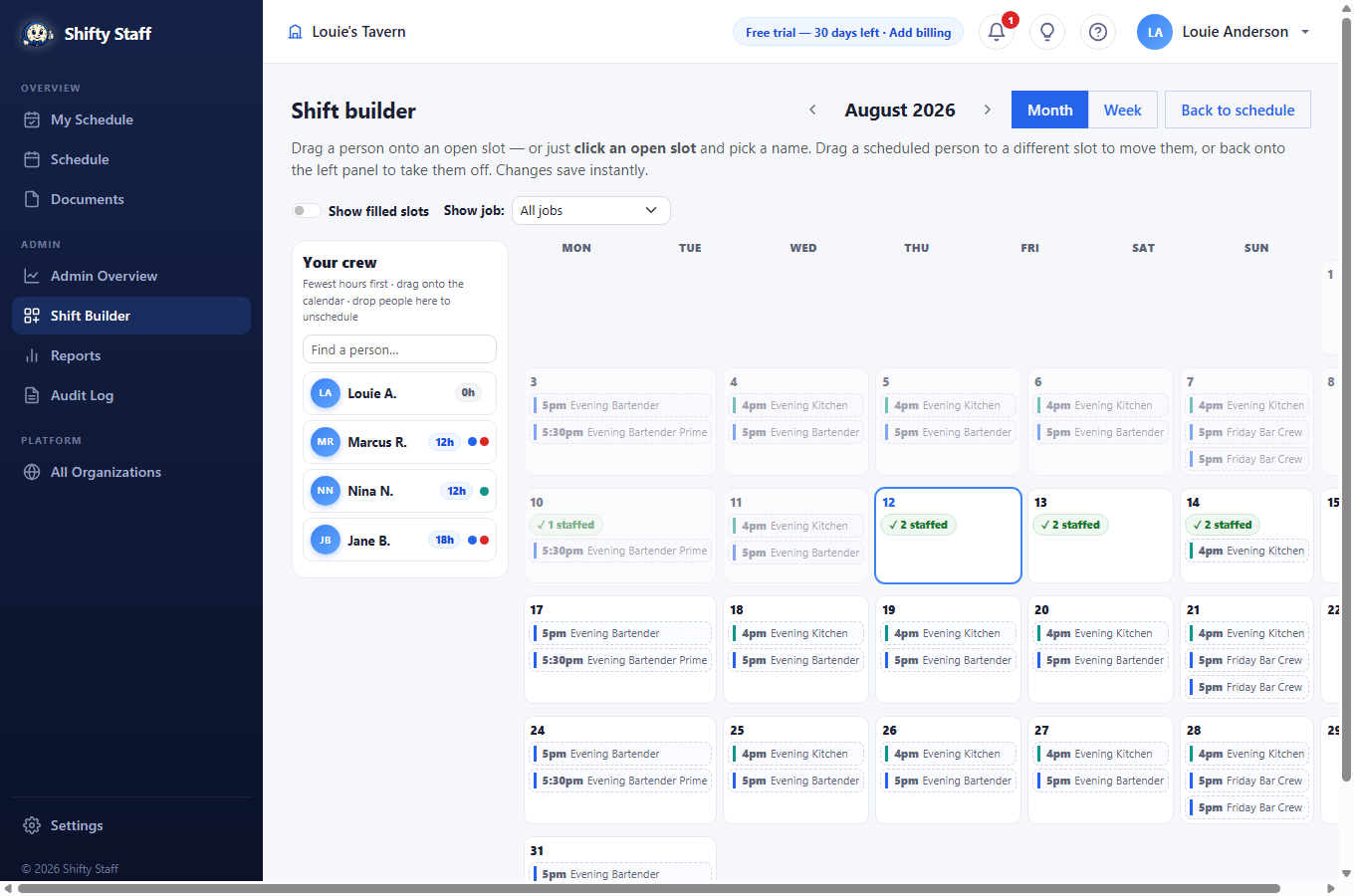
Find it in the left menu under Shift Builder. The month's shifts are on the right — every dashed box is a slot that still needs a person. Your crew is on the left, sorted with the fewest scheduled hours on top so spreading work fairly is a glance, not math. Each person shows an hours badge and colored dots for the jobs they work.
- Click an open slot and a small list pops up with everyone who can work that job (hours shown) — click a name, done.
- Or drag a person from the left onto a slot. Matching slots light up while you drag. Drag someone between slots to move them, or back onto the crew panel to take them off.
- Every change saves instantly and notifies the person — there's no separate publish step.
- Staffed slots tuck behind a green "✓ staffed" pill so you only see the gaps; flip Show filled slots to see (and move) everyone. Switch between Month and Week views — week view gives busy days tall columns.
- You can put someone on a job they don't hold — it saves, with a clear heads-up, so emergencies are possible but never accidents.
The Builder's smart helpers
- Best picks. Click any open slot and the top of the list suggests up to three people — the ones with the fewest hours who can actually work it — each with a plain note about anything the pick would bend ("prefers not to work Sundays", "would pass their 25h/week wish"). Click a pick and they're assigned.
- ✨ Fill open shifts. One button proposes a person for every open shift in view, hardest-to-fill first, without double-booking anyone. The picks appear as dashed orange chips — nothing is saved until you press ✓ on a chip (or Accept all). Press ✕ to wave one off.
- Colored open slots. A red slot means nobody can currently take it — check jobs, time off, and availability. An amber slot means only one or two people can. Fill those first, while there's still a choice.
- ↩ Changes. Everything you do on the page lands in a Recent-changes list at the top — one click undoes any of it, in any order, so the Builder can stay fast without ever being scary.